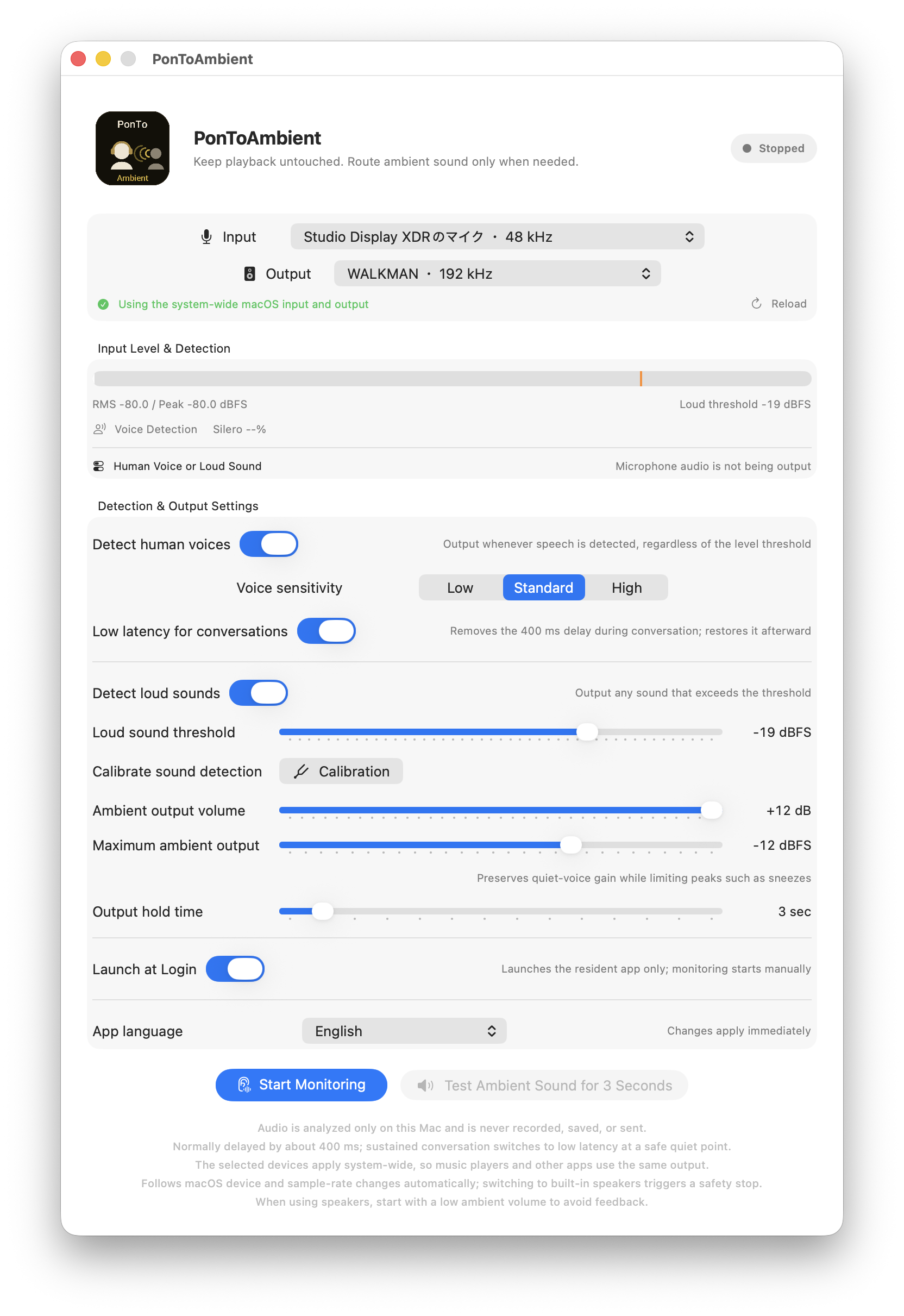
Monitoring · Output Off
The microphone is being analyzed, but ambient sound is muted while the app waits for a voice or a sound above the threshold.
PonToAmbient User Guide
PonToAmbient lets you keep enjoying music. It listens through your Mac microphone and sends ambient audio to the selected output only when it detects a human voice or a loud sound.
Background
For a while, music had become something I simply left playing in the background. Wanting to rediscover it as something to listen to attentively, I returned to dedicated listening through a DAC and headphones. The added immersion was wonderful—but it also meant missing the everyday sounds that matter, such as family calling or a pet crying out.
I wanted to preserve the fidelity and immersion while allowing only essential sounds from daily life to break through with minimal interruption. PonToAmbient was created from that idea.
macOS Quick Start
Complete the safety check with music paused, then test at your normal listening volume.
Screen Status
The microphone is not sent to your headphones just because monitoring is active.
The microphone is being analyzed, but ambient sound is muted while the app waits for a voice or a sound above the threshold.
A voice or loud sound opened the path from the microphone to the selected output. The trigger reason appears on screen.
The Silero percentage is the AI’s current voice probability. At Standard sensitivity, 65% is the detection threshold. Voice detection is independent of the loud-sound threshold, so a quiet call can still open the ambient path.
Real-world Example
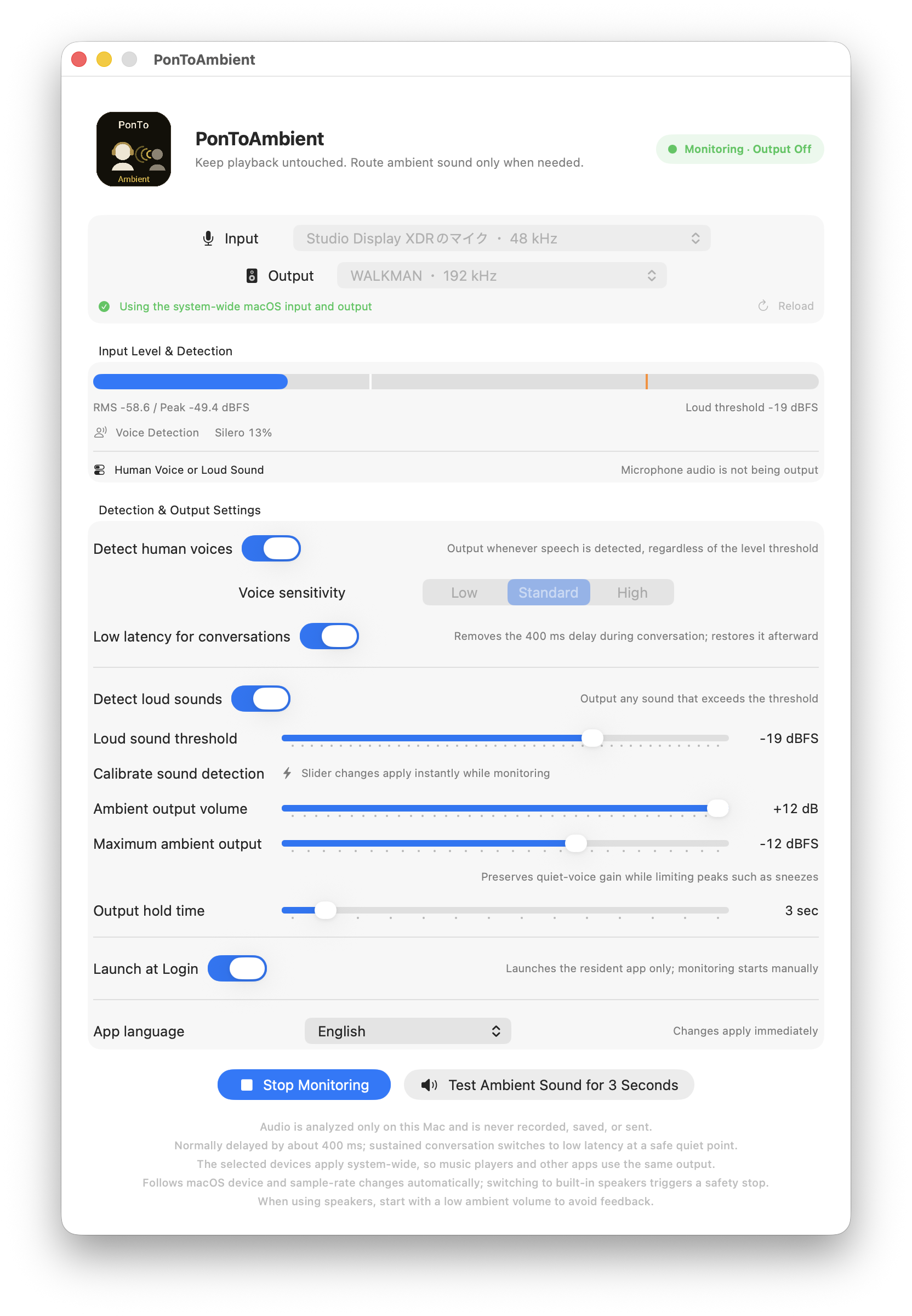
A practical starting point from a setup using a WALKMAN as a USB DAC.
Controls
Think of detection and listening level as two separate groups of controls.
Silero AI opens the ambient path whenever it recognizes human speech, regardless of the loud-sound threshold.
High reacts most readily. Approximate Silero thresholds are Low 85%, Standard 65%, and High 45%.
Silero only estimates whether the sound is human speech. It does not transcribe words or identify the speaker. It may therefore react to voices from a television or radio. All analysis stays on your Mac; microphone audio is not recorded, saved, or uploaded.
Voice Sensitivity changes the decision threshold, not how often Silero runs, so Low sensitivity is not a power-saving mode. Turning Detect Human Voice off stops Silero analysis, but microphone and audio processing continue while ambient or loud-sound monitoring remains active.
The first call uses the 400 ms pre-roll. Repeated speech switches to low latency at a safe silent point.
Passes any sound over the threshold, whether or not it is speech—useful for doorbells, claps, and household sounds.
Move left to react to quieter sounds or right to require louder sounds. Changes are immediate while monitoring.
Adjusts microphone audibility from -24 to +12 dB without changing the music app’s volume.
Preserves gain for quiet speech while limiting strong peaks such as sneezes. Lower values apply a stronger ceiling.
How long the ambient path stays open after the latest detection. Short values return to music sooner.
Keeps the app available from the menu bar after login. Monitoring still starts manually for safety.
Calibration
Calibration is available while stopped. Voice analysis pauses so you can focus on the loud-sound threshold.
Silero voice detection starts immediately, and a clear human voice can open the output without waiting. During roughly the first minute, it also adapts to steady room sound to suppress startup false positives. Loud-sound threshold detection is independent of this stabilization and follows your selected threshold from the moment monitoring starts.
It is the digital level reaching your Mac’s microphone. The reading changes with microphone type, distance, direction, and mic mode.
Conversation Mode
The app combines a 400 ms pre-roll with an automatic low-latency conversation path.
The app continuously holds about 400 ms of delayed microphone audio. When AI detects speech, it can open the path without cutting off the beginning.
Repeated voice detections switch to low latency at a safe silent point. The 400 ms path returns after the conversation ends.
This prevents typing or repeated claps from switching the audio path to low latency.
Listening Safety
Use Ambient Output Volume and Maximum Ambient Level together.
Controls how much quiet voices are amplified. Start low and raise it until normal calls are easy to hear.
Restrains strong peaks such as sneezes. It affects only PonToAmbient’s microphone path—not Amazon Music or other system audio.
The dBFS ceiling is a digital signal limit. Actual listening level still depends on your WALKMAN, DAC, amplifier, and headphones. Test with music paused and hardware volume low.
Microphone capture and audio processing run continuously while ambient monitoring is active, and Silero analysis adds work when voice detection is enabled. Watch the remaining charge when using a MacBook on battery, and connect power for long sessions when appropriate. USB DACs and other attached devices can add their own power draw. Stop monitoring when it is not needed.
Troubleshooting
Allow PonToAmbient in System Settings › Privacy & Security › Microphone. While stopped, select the input again. Stopping and restarting monitoring can also restore the route.
Select Standard microphone mode and watch whether the Silero percentage rises with speech. If distant speech is missed, choose High sensitivity and restart monitoring.
After a voice or loud sound opens the path, all ambient sound remains audible for the Hold Output duration. If the path opens incorrectly, move the loud threshold right or lower voice sensitivity.
Run calibration while stopped and make the real target sound. Move the slider left to react more easily or right to require a louder sound.
The app mutes while following a new route. Switching to built-in speakers causes a safety stop to prevent feedback; verify the output and restart monitoring manually.
Your music app may be using exclusive output. Select a mode that allows the output device to be shared with other apps.
Choose Show PonToAmbient from the menu-bar icon. Closing the window does not quit the resident app.
Privacy
PonToAmbient uses its bundled Silero model for on-device voice detection. It does not record, save, or upload microphone audio, and it does not use Apple Intelligence or cloud AI.